


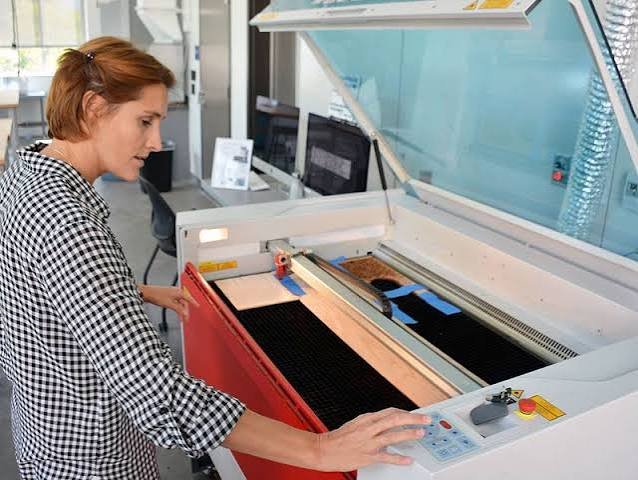
Buying your first laser cutting machine is one of the biggest decisions you’ll make when starting a laser cutting business, and it’s easy to either overspend on capability you don’t need yet, or underbuy and outgrow your machine within a few months. The good news is that the decision comes down to a handful of clear factors. Get those right, and the rest of the buying process is straightforward.
First, Begin With What You’re Actually Going to Make
Before looking at specs, get honest about your product line. Someone engraving wooden keychains and personalized ornaments from a spare room has very different needs than someone cutting acrylic signage or metal nameplates for corporate clients. Your intended products determine almost everything else on this list: the material, the machine type, and the power you’ll need to work efficiently.
Next, Focus on The Four Things That Actually Matter
1. Get the Right Laser Type
There are different types of laser engravers, and each of them is best for different materials. This is the first fork in the road. CO2 lasers are the most versatile option for small businesses because they cut and engrave wood, acrylic, leather, glass, fabric, and coated metals, covering the bulk of what most makers sell. If your product line is built around bare metals like stainless steel tumblers, aluminum tags, or brass plaques, you’ll want a fiber laser instead, since fiber systems mark uncoated metal with a permanence and precision CO2 lasers can’t match without added compounds. Most people starting choose CO2 first, simply because it opens the door to more product categories.
2. Next, Power
Wattage determines how fast you can cut and how thick a material you can get through in a single pass. For a business just getting started, machines in the 40–100W range cover almost every practical use case: enough to cut several millimeters of acrylic or hardwood cleanly, without the price tag or footprint of an industrial-grade unit. As a rule of thumb, more power means faster turnaround per order, which matters once you’re fulfilling orders on a deadline rather than just experimenting.
3. Check the Size of the Work Area
A larger bed lets you batch more pieces in a single run, which has a direct effect on how many orders you can turn around per hour. If you’re making small items like keychains or jewelry, a compact bed is fine. If you’re producing signage, cutting boards, or anything closer to full-sheet material, a larger working area will save you real time as your order volume grows.
4. Ensure Software Compatibility.
LightBurn has become the industry-standard design and control software for CO2 laser cutters, so it’s worth confirming any machine you’re considering supports it, even if it ships with its own bundled software. Compatibility here affects everything from your day-to-day workflow to how easily you can find tutorials, presets, and community support when you get stuck.
Buy for Where You’re Starting, Not Where You Hope to End Up
It’s tempting to buy the biggest, most capable machine available on the assumption that you’ll grow into it. In practice, most successful small laser businesses start with a compact desktop machine, prove out their product line and process, and upgrade once order volume genuinely demands it. A compact 40–55W desktop CO2 laser is enough to validate a product idea, build a customer base, and start generating consistent revenue, all without the space requirements or price commitment of a full production machine.
As your order volume increases, the calculus changes. A mid-range 100W machine with a larger bed and features like built-in autofocus can dramatically increase daily output without adding hours to your workday often the difference between a side hustle and a business that can support itself. And for businesses that have already outgrown entry-level equipment, a higher-speed, larger-format machine becomes worth the investment once order backlogs, not idle capacity, are the bottleneck.
Choose An OMTech Laser Cutter In The UK.
OMTech CO2 laser cutters are built around exactly this kind of staged growth, which makes it a practical place to start looking regardless of what stage your business is at.
- For a first machine, the OMTech Polar Lite 55W is a strong entry point, a genuinely compact desktop laser with built-in water cooling (so you’re not also buying and plumbing in a separate chiller), one-click autofocus, and a small footprint that suits a home studio or garage workshop.
- Once you’re ready to scale production, OMTech’s 100W mid-range CO2 machines offer a larger working area and enough power to move into thicker materials and bigger batches, without jumping straight to industrial pricing.
- For businesses processing high volumes on a deadline, machines like the OMTech Pronto series step up to faster cutting speeds and heavier-duty mechanics, built for shops where throughput is the priority.
Because OMTech’s range spans desktop to production-grade CO2 lasers and includes fiber laser options for anyone whose product line leans toward bare metal, it’s a sensible place to compare models side by side, whatever your starting budget or workspace looks like.
The Bottom Line
Choosing your first laser cutter isn’t really about finding the “best” machine on paper; it’s about matching a machine’s laser type, power, work area, and software support to the products you actually plan to sell, then buying a size that fits where your business is today. Start realistic, prove your product line works, and upgrade when growth, not guesswork, tells you it’s time.
